Submit your request, and our specialists will contact you shortly.
Submit your request, and our specialists will contact you shortly.
Submit your request, and our specialists will contact you shortly.
Submit your request, and our specialists will contact you shortly.
Submit your request, and our specialists will contact you shortly.
You can review the methodology and training program for "Corporate Server 2024" via the link
We regularly update our product and share the news. Subscribe to our newsletter to stay up to date with the latest developments in the R7 Office environment.

When data volumes grow and conventional spreadsheets start slowing down, making calculations more complicated, and taking too much time to prepare reports.
When you need a tool for data preparation, calculations, KPI visualization, and building interactive dashboards.
Create reports and dashboards without lengthy implementation projects, complex infrastructure configuration, or the need for a dedicated development team.
A domestic analytics and data visualization solution that reduces dependence on foreign BI platforms and services.
R7 Analytics helps you work with large Excel files, pivot tables, and complex BI workflows in a single tool.
View and analyze your data without switching between multiple systems.
Connectors and the ETL module automatically collect data from different sources and convert it into a unified format for further analysis.
Create custom metrics and calculate KPIs and other business metrics without complex programming.
Analytics is built using ready-to-use tools and formulas that are accessible to business users.
Visualize data using charts, graphs, funnels, maps, KPIs, traffic-light indicators, and other elements.
Combine multiple visualizations into a single interactive dashboard for managers and teams.
No programming skills or dedicated BI team are required to create analytics.
Most workflows are available through a visual interface and ready-to-use configuration tools.
Remove duplicates and errors, combine tables, group information, and prepare data for report creation.
This reduces manual work and the risk of errors during analysis.

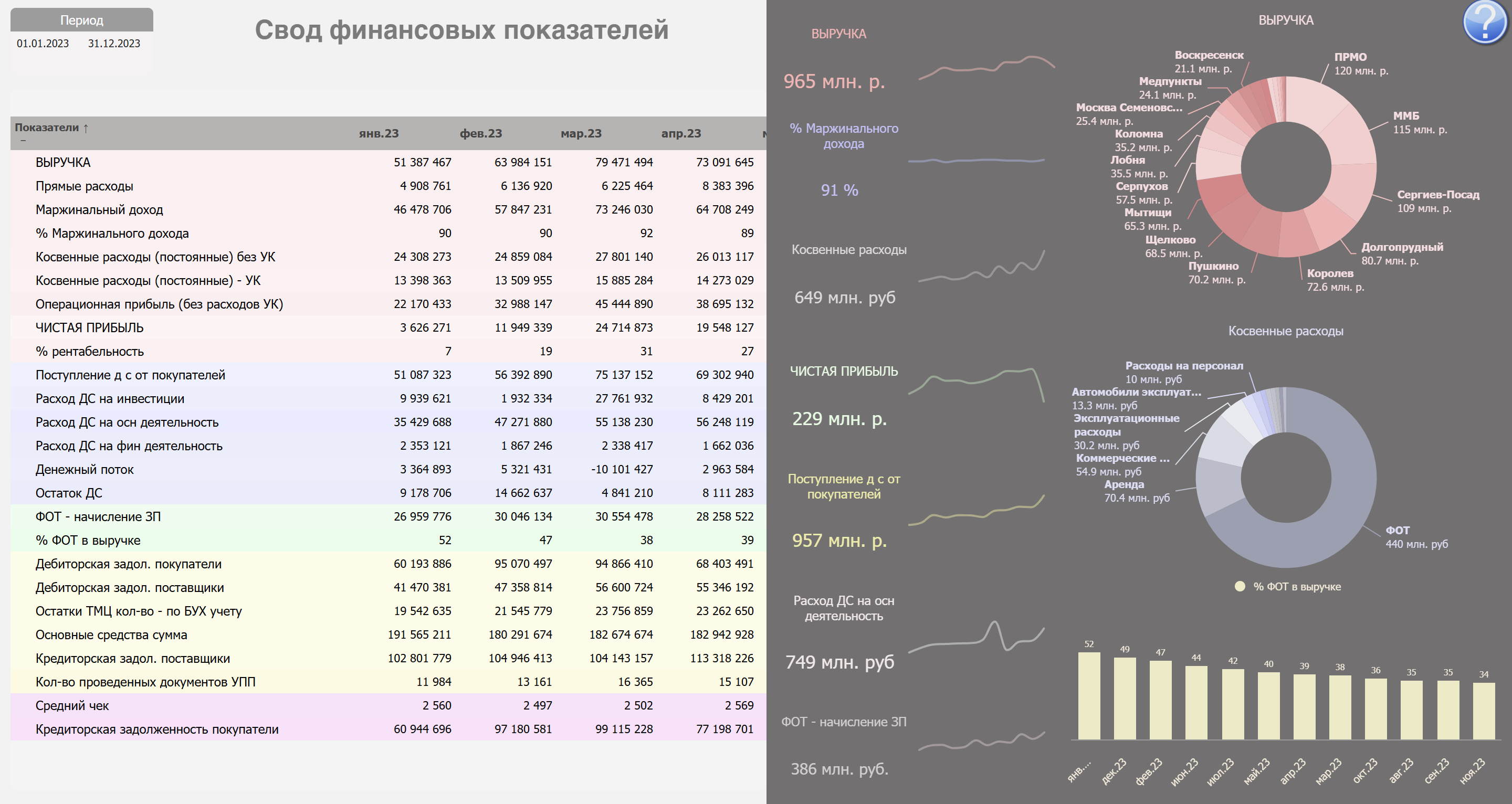
Monitor financial performance, KPIs, budget execution, plans, and other key company metrics.
Analyze the sales funnel, manager performance, customer activity, and deal trends using up-to-date data.
Analyze advertising campaigns, traffic sources, customer acquisition costs, and the effectiveness of marketing channels.
Monitor revenue, expenses, budget execution, and deviations between actual and planned figures.
Track project timelines, resources, implementation stages, and task completion across teams and business areas.
Monitor departmental workloads, task completion, operational performance, and internal company processes.
Analyze workforce metrics, staff structure, employee workloads, and organizational trends.
Prepare regulated reports and consolidate data from different departments and information systems.
R7 Analytics can be used to monitor procurement, logistics, customer service, document workflows, process quality, and a wide range of other business tasks.
The desktop application is ready to use out of the box. Go from installation to your first dashboard in less than 20 minutes.
R7 Analytics does not consume server resources. Your data stays on your PC and is always available when you need it.
Connect corporate data, build dashboards, and analyze metrics in a familiar spreadsheet environment without separate BI systems.
R7 Analytics can be used in infrastructures with heightened data security requirements. The solution is suitable for corporate and government organizations.
Data, reports, and dashboards remain within the organization’s infrastructure. The solution can be used without transferring information to external services.
Administrators manage user access and assign permissions for viewing and working with analytics in accordance with the company’s internal policies.
R7 Analytics is part of the R7 product portfolio, which is included in the Unified Register of Russian Software and is used by major companies and government organizations.
R7 Office is already used in Russian digital environments and partner infrastructures, where it handles large traffic volumes and millions of active users every day.



See how R7 Analytics can work within your infrastructure. We will demonstrate, using your own use cases, how to connect corporate data, prepare analytics, build dashboards, and work with BI.
Conventional spreadsheets are well suited for storing data and performing calculations, but they quickly become difficult to manage when working with large volumes of information. Files become cumbersome, numerous pivot tables accumulate, and reports often require extensive manual work.
R7 Analytics enables users to connect data from different sources, process it automatically, and visualize it through interactive dashboards. Instead of working with multiple interconnected files, users get a single environment for analysis and decision-making.
No. R7 Analytics is built on a no-code approach and designed for analysts, managers, and business users.
Most tasks, including connecting data, configuring metrics, filters, and visualizations, can be performed through a graphical interface without writing code.
Yes. R7 Analytics supports connections to CRM systems, 1C, and user-defined spreadsheets.
Yes. R7 Analytics can handle common tasks for which companies use a combination of Excel and Power BI, including data preparation, metric calculation, information visualization, and the creation of interactive dashboards.
Yes. R7 Analytics is part of the R7 ecosystem of Russian software products, is included in the Unified Register of Russian Software, and can be used as part of an organization’s software import substitution strategy.
The solution is designed for corporate and government organizations. It helps reduce reliance on foreign analytics platforms while keeping corporate data under the organization’s control within its own IT infrastructure.

This website uses cookies to improve site performance, analyze traffic, and personalize content.
Technical cookies required for the website to function. These cannot be disabled.
Help us understand how you use the website so we can improve it.
Used to display relevant ads and measure campaign effectiveness.