Submit your request, and our specialists will contact you shortly.
Submit your request, and our specialists will contact you shortly.
Submit your request, and our specialists will contact you shortly.
Submit your request, and our specialists will contact you shortly.
Submit your request, and our specialists will contact you shortly.
You can review the methodology and training program for "Corporate Server 2024" via the link
We regularly update our product and share the news. Subscribe to our newsletter to stay up to date with the latest developments in the R7 Office environment.

 Windows
  macOS
macOS  Linux
Linux Fully compatible with PPTX, PPT, ODP, PDF, and other formats. Layouts, fonts, object positioning, and animations appear exactly as you intended.
The editor is lightweight and handles large presentations with images and charts without slowing down. Works equally well on office PCs and everyday home laptops.
No need to find a different app for each operating system. The interface, keyboard shortcuts, and workflow are consistent across Windows, macOS, Linux, and other operating systems.
The editor requires no monthly subscription and has no dependency on foreign services. Store your files locally or work through the R7 cloud — either way, your data stays fully under your control.
Choose from ready-made themes and layouts to give your slides a clean, professional look. Titles, subtitles, and content fall right into place.
Format headings and body text, create lists, and highlight key points with color or font size. Text stays legible even from the back of the room.
Add photos, diagrams, shapes, and simple infographics. Highlight key elements, build flowcharts, and illustrate complex ideas visually.
Build charts from your numbers — bar, line, pie, and more. Perfect for reports and any presentation where the data is the story.
Set smooth transitions between slides and add simple object animations. Enough to keep your presentation engaging, without the visual clutter.
Guides and snapping make it easy to position text, images, and blocks precisely. Your slides look polished even if you’re not a designer.
Add notes to each slide — key points, figures, examples. During your presentation, you see your prompts; the audience sees only the slides.
Launch a full-screen presentation and control slides with your keyboard or a clicker. No extra buttons or windows in the way.
Save your presentation as a PDF or as a set of images for printing or publishing online.
The R7 Presentation Editor supports dozens of plugins that extend the editor’s capabilities and eliminate repetitive tasks. Extensions install easily and become part of the familiar interface right away.
You can add QR codes, build mind maps, use advanced charts, insert icons, or enable autosave.
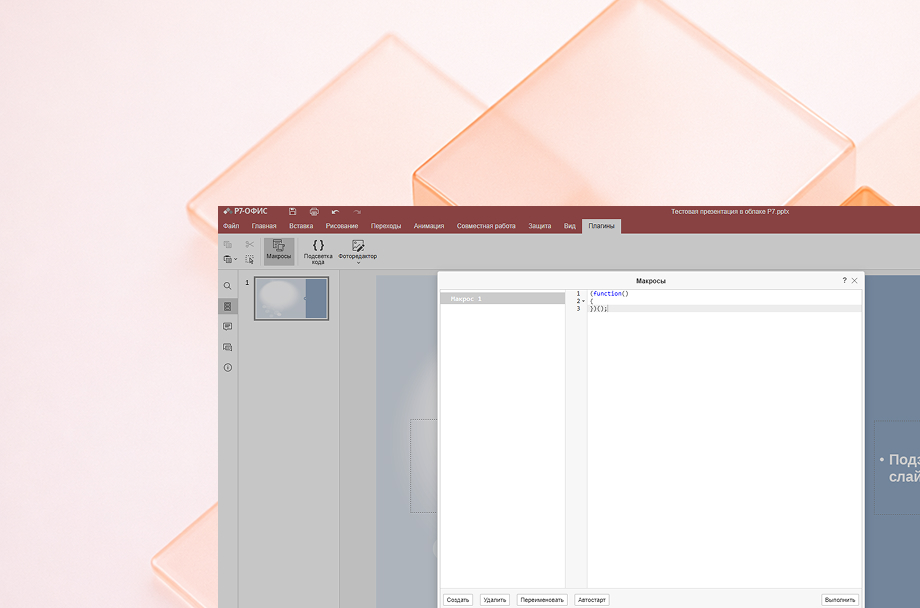
Macros simplify your work when you’re doing the same things over and over: placing a logo, formatting a title slide, highlighting key blocks.
Create a macro once, and that sequence of actions runs automatically whenever you need it.
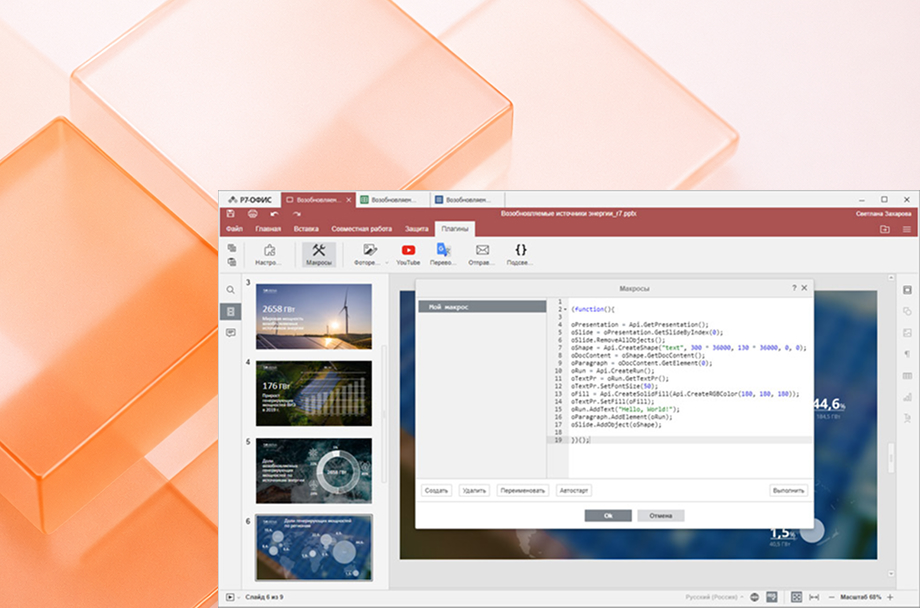
The R7 Presentation Editor supports dozens of plugins that extend the editor’s capabilities and eliminate repetitive tasks. Extensions install easily and become part of the familiar interface right away.
You can add QR codes, build mind maps, use advanced charts, insert icons, or enable autosave.
Macros simplify your work when you’re doing the same things over and over: placing a logo, formatting a title slide, highlighting key blocks.
Create a macro once, and that sequence of actions runs automatically whenever you need it.
30 days of full access to all features. After that, a license is required.
The app is available for all major operating systems: Windows, macOS, Linux Debian, Ubuntu, CentOS, Astra Linux, RED OS, ROSA, ALT Linux, Linux
All R7 Office editors in one convenient app. Work with documents, spreadsheets, and presentations on any device — at home, on the go, or at school. Files sync automatically and are always at hand.



The key difference is that the editor is fully domestic and listed in the Unified Register of Russian Software. It runs across multiple operating systems and has no dependency on foreign services or their policies.
Feature-wise, you’ll find all the tools you’d expect: themes, layouts, images, charts, animations, presenter notes, and a flexible slideshow mode. Everything you need for work or study.
Yes. The editor reliably opens PPTX, PPT, ODP, and other common presentation formats. Layouts, fonts, object positioning, and basic animations are all preserved.
Yes. You can create and edit presentations entirely offline. An internet connection is only needed if you’re using cloud storage or want to sync files across devices.
Will the editor run on an older computer?
Most likely, yes. The application uses system resources efficiently, launches quickly, and runs reliably even on older laptops. If a device handles standard office applications, R7 will work without any issues.
Yes. The mobile Presentation Editor is part of the unified R7 app for working with documents. You can edit text, reorder slides, swap images, and adjust design elements right from your phone.
The app is available on the App Store, Google Play, RuStore, and for Aurora OS.
Other redactors in the R7 family:
This website uses cookies to improve site performance, analyze traffic, and personalize content.
Technical cookies required for the website to function. These cannot be disabled.
Help us understand how you use the website so we can improve it.
Used to display relevant ads and measure campaign effectiveness.